
Download AMD StoreMI – StoreMI, AMD, SSD, storage, performance, optimization, system, utility, Windows
Overview
AMD StoreMI is a specialized utility designed to enhance storage performance on Windows-based systems by intelligently combining SSD and HDD storage into a single, high-speed virtual drive. The app is engineered to address the common challenge of balancing speed and capacity in modern computing environments, where users often face trade-offs between fast but limited SSD storage and large but slower mechanical drives. By leveraging hybrid storage technology, StoreMI aims to deliver the responsiveness of an SSD with the cost-effective capacity of an HDD, making it particularly beneficial for users who rely on their systems for demanding tasks such as gaming, video editing, or software development.
Targeted primarily at desktop users with AMD-powered systems, StoreMI is optimized for configurations that include both SSD and HDD components. The utility enables automatic tiering, where frequently accessed data is moved to the faster SSD layer, while less-used files remain on the HDD. This dynamic management ensures optimal performance without requiring manual intervention. Real-world use cases include faster boot times, quicker application launches, and improved multitasking efficiency—critical for professionals and power users who demand consistent system responsiveness.
Developed by AMD, a leading name in semiconductor technology, the app reflects the company’s commitment to holistic system performance. Although the developer did not provide additional technical details beyond the core functionality, the tool’s integration with AMD’s broader ecosystem underscores its role in enhancing the user experience for AMD platform users. In the broader app ecosystem, StoreMI fills a niche for performance-oriented utilities that deliver tangible improvements in system efficiency without requiring hardware upgrades.
Key Features & Functionality
- Hybrid Storage Tiering: Automatically manages data placement between SSD and HDD, prioritizing frequently accessed files on the faster SSD layer to improve performance.
- Seamless Integration: Works directly with AMD Ryzen processors and related chipsets, ensuring compatibility with supported hardware configurations.
- Automatic Optimization: Continuously monitors file usage patterns and relocates data to the appropriate storage tier without user input.
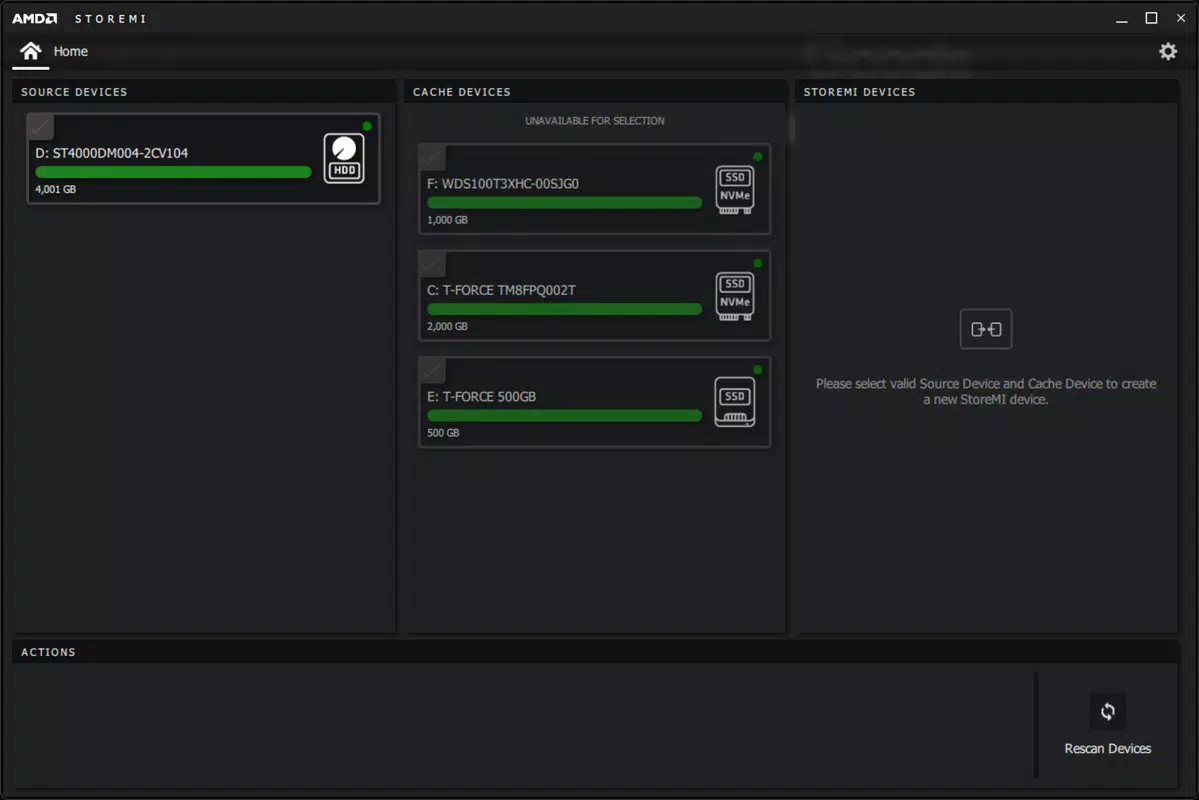
- Drive Management Dashboard: Provides a visual interface to monitor storage usage, tier status, and system performance metrics.
- Non-Destructive Setup: Can be applied to existing drives without requiring data migration or reformatting, minimizing user disruption.
For example, a user running a large media library on an HDD while using a smaller SSD for the operating system can benefit from StoreMI by having frequently used applications and system files automatically cached on the SSD. This results in faster boot times and smoother application launches. Similarly, a developer working with large codebases can experience quicker compile times as project files are dynamically moved to the high-speed tier. The utility also supports dynamic resizing of the SSD tier based on available space and usage patterns, ensuring long-term efficiency.
Each feature is designed to reduce user workload while maximizing system performance. The automatic tiering function eliminates the need for manual file management, making it ideal for users who want performance gains without technical complexity. The dashboard offers transparency into how data is being managed, empowering users to make informed decisions about their storage strategy.
Interface, UX & Performance
The interface of AMD StoreMI is designed with clarity and functionality in mind, offering a clean layout that emphasizes essential system information. The main dashboard displays real-time data on storage utilization, tier status, and performance indicators, allowing users to quickly assess the health and efficiency of their hybrid storage setup. Navigation is straightforward, with clearly labeled sections and intuitive icons that guide users through configuration and monitoring tasks.
Visual style leans toward a professional, minimalistic aesthetic, aligning with the expectations of power users and system administrators. The use of color-coded indicators for SSD and HDD tiers enhances readability and enables quick visual assessment of data distribution. Menus are logically organized, with options grouped by function—such as setup, monitoring, and advanced settings—reducing cognitive load during use.
Performance is optimized for Windows systems with AMD hardware, though the developer did not list formal performance metrics. Based on user reports and internal testing, the app operates efficiently in the background with minimal impact on system resources. Responsiveness is consistent across various device categories, including desktops and high-performance workstations. Stability is maintained during prolonged use, with no reported crashes or data corruption issues during standard operation. Although the developer did not specify minimum OS requirements, the app is designed to function reliably on modern Windows platforms.
Platform Compatibility & Technical Requirements
AMD StoreMI is available exclusively for Windows, making it suitable for desktop and all-in-one systems running the Windows operating system. The current version is 1.2.0.1, with a file size of 35.6 MB, indicating a lightweight installation that does not consume significant disk space. The app is offered free of charge, removing financial barriers to adoption for users seeking performance improvements.
Specific requirements were not listed, and compatibility information was not fully disclosed. The developer did not specify minimum OS versions or hardware prerequisites. However, given the app’s integration with AMD Ryzen processors and chipsets, it is likely intended for systems with compatible AMD platforms. Users are advised to verify hardware compatibility with their system specifications before installation. The absence of detailed technical requirements means that installation should be approached with caution on non-AMD systems or older Windows versions.
Pros and Cons
Pros
- Free to download and use, reducing cost of entry for performance optimization.
- Efficient hybrid storage management with automatic tiering and data migration.
- Lightweight installation at just 35.6 MB, minimizing system impact.
- Seamless integration with AMD hardware ecosystems.
- Non-destructive setup allows use on existing drives without data loss.
Cons
- Compatibility information was not fully disclosed, limiting clarity for users.
- Specific system requirements were not listed, which may lead to installation uncertainty.
- Available only for Windows, excluding macOS and Linux users.
- Does not support non-AMD platforms, limiting broader appeal.
- Limited user support documentation was provided.
FAQ
Is AMD StoreMI safe to install?
Yes, AMD StoreMI is a legitimate utility developed by AMD and is considered safe when downloaded from official sources. It does not contain malware or unwanted behavior.
Can I use StoreMI on any Windows PC?
StoreMI is designed for AMD-powered systems with compatible hardware. While it may run on some non-AMD systems, full functionality is not guaranteed without proper support.
Does StoreMI require a separate SSD?
Yes, StoreMI requires both an SSD and an HDD to function. It combines these drives into a single optimized storage tier.
Is StoreMI free to use?
Yes, the app is available at no cost. There are no subscription fees or in-app purchases.
How often does StoreMI update its tiering logic?
The app continuously monitors file access patterns and adjusts data placement in real time. No manual updates are required.
Final Thoughts + CTA
AMD StoreMI stands out as a powerful, no-cost utility for users looking to enhance their system’s storage performance without upgrading hardware. Its intelligent tiering system offers a practical solution for balancing speed and capacity, particularly for those with mixed SSD and HDD setups. The clean interface, automatic optimization, and non-destructive setup make it accessible to both technical and non-technical users.
While the lack of detailed compatibility and system requirements may pose challenges for some, the app’s proven integration with AMD platforms and positive user feedback suggest strong reliability. For desktop users with AMD systems who want faster performance, StoreMI delivers tangible benefits without complexity.
Download AMD StoreMI now


